Asset Management in Rails: From Sprockets to Propshaft
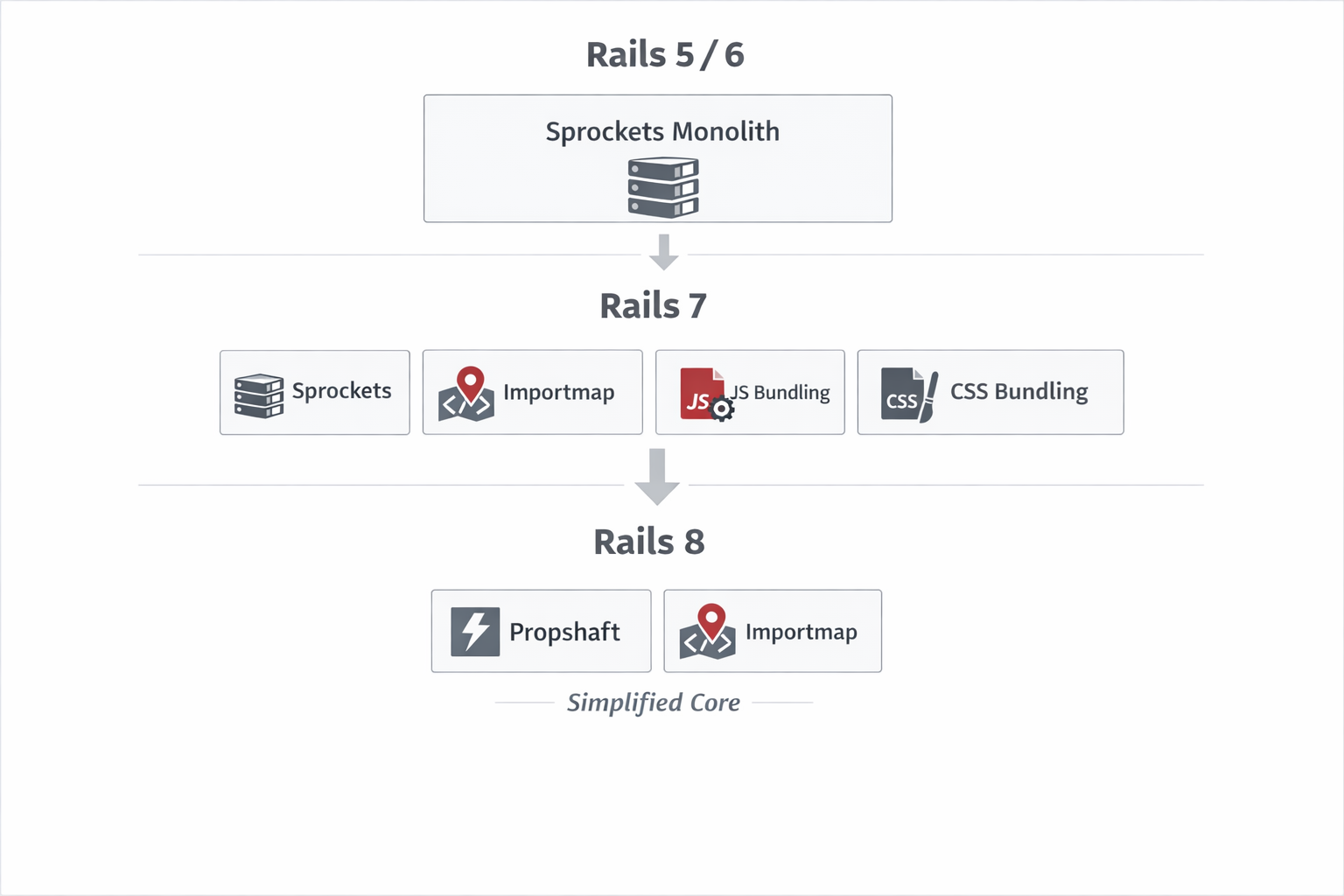
Asset management in Rails has evolved significantly over the last few versions. What began as a monolithic asset pipeline has gradually shifted toward a more modular, browser-native approach.
Understanding this evolution is important when making architectural decisions for a new Rails application — or when modernizing an existing one.
This article examines:
- Asset management in Rails 7 (Sprockets + bundling options)
- The role of js-bundling and css-bundling
- Importmap as an alternative model
- Rails 8 defaults: Propshaft + Importmap
- When to choose each approach
Asset Management in Rails 7
Rails 7 moved away from Webpacker (the old default) and introduced flexibility without forcing a single JavaScript strategy. Instead of prescribing one approach, it allows teams to choose between:
- Sprockets (asset pipeline)
- importmap-rails
- js-bundling-rails
- css-bundling-rails
This modularity allows architectural decisions to be aligned with application complexity.
Sprockets in Rails 7
Sprockets is the traditional Rails asset pipeline and remains responsible for asset compilation and fingerprinting in production.
Its responsibilities include:
- Discovering assets across configured load paths (
app/assets,lib/assets,vendor/assets, etc.) - Processing assets (historically concatenation, compression, and preprocessing)
- Generating digests (fingerprints) for cache invalidation
- Creating a manifest file mapping logical names to fingerprinted files
- Writing compiled assets to
public/assets
When running:
rails assets:precompile
Sprockets:
- Scans configured asset paths
- Resolves dependencies
- Applies processing rules
- Generates fingerprinted filenames
- Writes files to
public/assets - Generates a manifest file
Example output:
application-3f9c1a8d.js
application-a92d7b11.css
Sprockets also generates a manifest file such as:
.sprockets-manifest-546546.json
This JSON file maps logical asset names to their fingerprinted counterparts:
{
  "application.js": "application-3f9c1a8d.js",
  "application.css": "application-a92d7b11.css"
}
Rails view helpers consult this manifest in production to serve the correct digested file. If file contents change, the fingerprint changes, ensuring safe long-term HTTP caching.
Importmap in Rails 7
Importmap introduces a browser-native JavaScript model without requiring a bundler.
Instead of compiling JavaScript into a single bundle, importmap defines a mapping between module names and URLs using config/importmap.rb. This configuration is rendered into the HTML as a <script type="importmap"> block.
Example:
# config/importmap.rb
pin "sortablejs", to: "https://cdn.jsdelivr.net/npm/sortablejs/+esm"
When the browser encounters:
import Sortable from "sortablejs";
It resolves the module according to the import map.
Flow
JS Modules → Importmap Resolution → Sprockets Fingerprint → Serve
There is no bundling phase and no transformation layer. Each module is served individually. This simplifies debugging and removes the need for source maps in most cases.
Trade-offs:
- No tree shaking
- More HTTP requests
- Simpler deployment model
Importmap prioritizes operational simplicity over build-time optimization. This works great for most Rails apps that use Turbo and Stimulus. But it has a limitation — not all JavaScript libraries from npm are compatible with import maps. Some only ship in formats the browser can't load directly.
JavaScript with js-bundling-rails
js-bundling-rails integrates modern JavaScript bundlers (such as esbuild, rollup, or webpack) while keeping them external to the Rails framework.
Unlike importmap, this approach introduces a build step before the asset pipeline runs.
How It Works
- JavaScript source files live in
app/javascript - One or more entry points are defined (commonly
application.js) - A bundler builds a dependency graph
- Imports are resolved and flattened
- Tree shaking and minification are applied
- The output is written to:
app/assets/builds
After bundling, Sprockets fingerprints the compiled file during assets:precompile.
Full flow:
JS Source → Bundler → app/assets/builds → Sprockets → public/assets
Because bundling transforms the original source, source maps (.js.map) are generated to map compiled code back to original modules during debugging.
This model is appropriate for applications with heavier frontend logic or large dependency graphs.
CSS with css-bundling-rails
css-bundling-rails follows the same philosophy as js-bundling-rails but for stylesheets.
Modern CSS development often requires tooling such as:
- Tailwind CSS
- PostCSS
- Dart Sass
- Bootstrap via build tools
Instead of relying on Sprockets for preprocessing, css-bundling delegates transformation to external tools.
How the Build File is Generated
Suppose you have:
app/assets/stylesheets/application.postcss.css
In package.json, a build script is defined, for example:
"build:css": "postcss app/assets/stylesheets/application.postcss.css -o app/assets/builds/application.css"
When this script runs (via yarn build:css or as part of bin/dev), PostCSS:
- Parses the source file
- Resolves imports
- Applies configured plugins
- Outputs the compiled file to:
app/assets/builds/application.css
Afterward, during rails assets:precompile, Sprockets fingerprints this generated CSS file and writes it into public/assets.
Flow:
CSS Source → CSS Tooling → app/assets/builds → Sprockets → public/assets
This approach enables modern CSS ecosystems while keeping the asset pipeline focused on delivery and caching.
Rails 8: Propshaft + Importmap by Default
Rails 8 refines the direction introduced in Rails 7 by simplifying the default asset stack even further.
The default asset setup includes:
- Propshaft
- importmap-rails
This combination reflects a clear separation of concerns:
- Propshaft handles asset delivery, fingerprinting, and manifest generation
- Importmap handles JavaScript module resolution
- External tooling is only introduced when explicitly required
In this model, Rails assumes that:
- Modern browsers can handle native ES modules efficiently
- HTTP/2 reduces the overhead of multiple asset requests
- Operational simplicity is often more valuable than aggressive frontend optimization
By removing implicit processing and minimizing build-time requirements, Rails 8 encourages an architecture where complexity is introduced intentionally rather than by default.
What is Propshaft?
Propshaft is a simplified replacement for Sprockets.
It intentionally removes complexity and focuses only on:
- Asset lookup
- Digest generation
- Manifest mapping
- Serving fingerprinted assets
It does NOT:
- Concatenate assets
- Transpile JS
- Minify by default
- Perform advanced processing
In other words, it assumes that:
If you need compilation, use external tooling.
If you only need asset delivery and fingerprinting, keep it simple.
How Propshaft Improves on Sprockets
Compared to Sprockets, Propshaft is:
1️⃣ Simpler Internally
- Smaller surface area
- Fewer transformation layers
- Easier to reason about
2️⃣ More Predictable
- No implicit processing
- No magic directives like
require_tree - Explicit file usage
3️⃣ Better Aligned with Modern Tooling
- Encourages separation of concerns
- Works cleanly with bundlers
- Works naturally with Importmaps
4️⃣ Operationally Lean
- Faster precompile phase
- Less asset pipeline overhead
- Cleaner mental model
Propshaft focuses on being a digesting and serving layer — not a build system.
When to Use Each Approach
Choosing between js-bundling, css-bundling, and importmap should be based on application complexity and operational constraints.
Use Importmap When:
- JavaScript complexity is moderate
- You are building CRUD-heavy SaaS applications
- You use Hotwire / Stimulus
- You want minimal infrastructure complexity
- You want to avoid Node in production
Benefits:
- No build step
- Simpler CI
- Smaller Docker images
- Direct debugging
Trade-off:
- No tree shaking
- More HTTP requests
Use js-bundling When:
- Building React, Vue, or SPA-style applications
- Large dependency graph
- Need tree shaking
- Need advanced JS optimization
- Heavy frontend logic
Benefits:
- Optimized payload size
- Advanced tooling n- Better control over performance
Trade-off:
- Build complexity
- Node dependency
- Source map management
Use css-bundling When:
- Using Tailwind, PostCSS, or Sass
- Need modern CSS tooling
- Want CSS preprocessing
- Rely on plugin ecosystems
Architectural Perspective
The shift from Sprockets to Propshaft reflects a broader philosophy change:
- Earlier Rails versions tried to manage everything inside the asset pipeline.
- Modern Rails separates build tooling from asset delivery.
- Rails 8 defaults assume browsers are powerful enough to handle native modules.
The key decision today is not about which tool is “better,” but:
- How complex is your frontend?
- What level of optimization do you require?
- How much operational overhead are you willing to accept?
For many business applications, operational simplicity outweighs aggressive frontend optimization.
For frontend-heavy products, a bundling strategy remains appropriate.
Conclusion
Rails 7 offers flexibility with Sprockets and optional bundling.
Rails 8 simplifies the default with Propshaft and Importmap.
Both approaches are valid. The right choice depends on:
- Application scale
- Team expertise
- Performance goals
- Deployment environment
Understanding these trade-offs allows you to design asset architecture intentionally — rather than following defaults blindly.